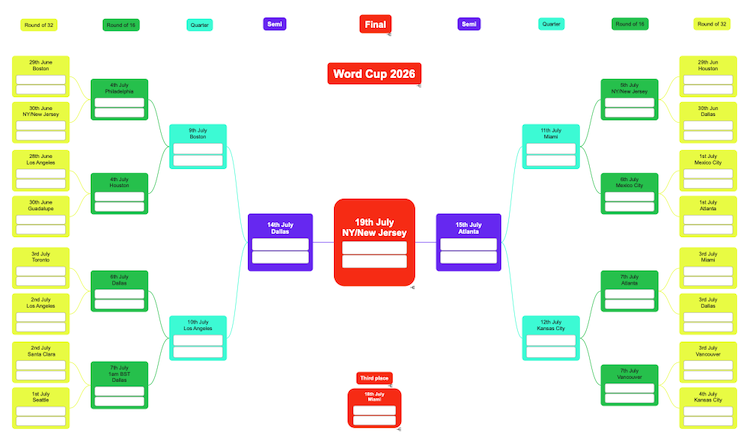
To help visualize every scenario, we created a World Cup bracket in SimpleMind. It’s a great example of how mind maps can turn complex information into a clear visual overview—whether you’re planning a project, organizing ideas, or following the biggest football tournament in the world.
Click to download this .pdf
Or download the partially filled .pdf
Click to download the printable PDF World Cup Bracket.
How it’s made
- Create a new Mind Map in SimpleMind.
- For the Black and White version, apply the Stylesheet “Black and White”.
- The version with different colors was made by creating a new custom stylesheet where we added custom colors.
- Start with a central theme and apply a horizontal layout and select the direction “Automatic”.
- Start adding topics; one branch will automatically go to the right and the other will go to the left.
- We have used “Labels inside Topics” so you can fill in the countries. In Style, you can apply a call-out style so the label will look like it has a border. You can also set a bigger font for the labels that are closer to the final.
Tip! When adding the label, add some text first. Next, edit the text and use spaces only. You can easily copy/paste that label. - In this mind map, we have adjusted the minimum width (and height of the Final) via Style to give the labels inside the topics a bit more room.
- We have added a new central theme and applied a free-form layout and added “final, semi, etc”. We’ve next selected the relations (long press the first one) and customized the color via “Element Style” to match the background. This way, the relations are invisible. Another method would be to add multiple central themes. Use snap options if needed to perfectly line up your topics.
