We’re excited to bring you the SimpleMind 2.10 update. Here is a breakdown of what’s new!
Make Your Mind Map Yours: Custom Backgrounds
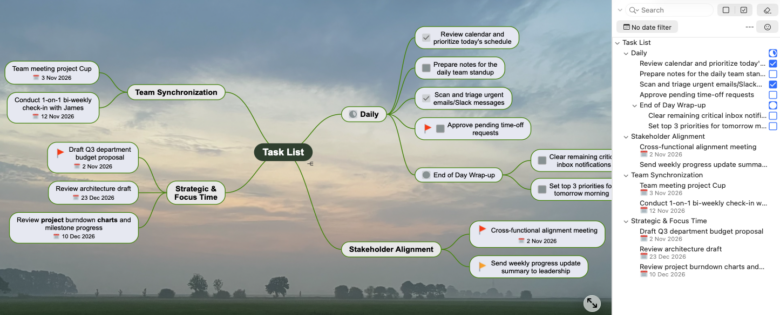
Give your maps a personal touch! You can now upload your own images and patterns to customize your background workspace.
Pattern Textures: Any image smaller than 1024×1024 pixels will automatically tile across your board to create a pattern background.
Full Canvas Images: Larger images will scale to fill your entire canvas.
Whether you want a dark subtle grid, a cozy paper texture, or a custom backdrop, you can do it all in SimpleMind 2.10.
Search & Filters in Outline View
Finding what you need in complex maps just got a whole lot smoother. Search is now fully integrated directly into the Outline View.
Easily locate specific text while staying in a structured, hierarchical view. Apply and combine multiple filters effortlessly.
Zero In on Daily Priorities: The “Today” Date Filter
With the new “Today” date filter, you can instantly highlight and display only topics assigned to today’s date. It’s the fastest way to see your daily to-do list in large mind maps.
Improved Read-only and Full-screen
On iPad, iPhone and Android you can now open mind maps in read-only mode, letting you review, present, or browse complex maps without making accidental changes. Long press the Mind Map file to select “Open in Read-only”.
Phones now also have a Full-screen button. Switch between full-screen and normal editing with a single tap. Long press for options so you can switch to read-only.
SimpleMind for Windows visual update
We’ve updated the app icons to align seamlessly with Windows 11 design standards. Larger, clearer icons with increased padding around icons for a cleaner, more spacious, and modern toolbar feel.
Find all features via the links below.
SimpleMind Pro for Mac
SimpleMind Pro for Windows
SimpleMind Pro for iPad&iPhone
SimpleMind Pro for Android
